
Work pattern sharing
Hybrid Work Schedules is designed to help organisations support collaboration while maintaining appropriate privacy controls for employees.
-
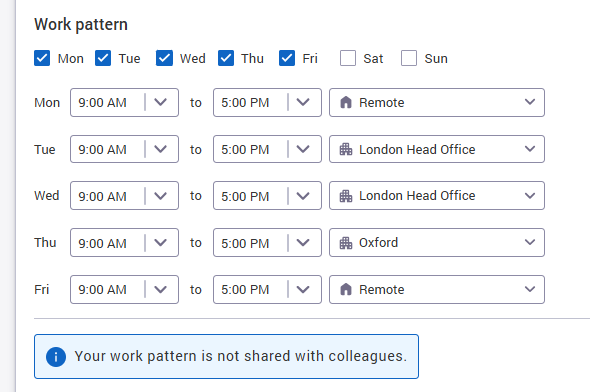
Users will see the option to Share my work pattern in Work hours and locations user settings page.
-
Each user can choose whether to share their schedule.
-
When a user opts in, colleagues can use the shared schedule information to understand when that person is likely to be in the office and plan collaboration more easily.
-
By default, Share my work pattern is disabled, so users must actively opt in when setting their default pattern.
Preventing work pattern sharing for your organisation
If you wish to prevent all users from sharing their work pattern, it is possible for Matrix Booking to disable this option for your organisation. Raise a support ticket and our team will be able to assist.
Once disabled, users will still be able to set their work pattern but it will not be visible to anyone else in the organisation.
A message on the Work hours and locations page informs the users of this.
Colleagues bookings in My Schedule
In addition to work schedules, which signal intent to attend an office, booking information can also appear for colleagues in My Schedule. Whether colleagues' bookings appear and which bookings display depends on your organisation's settings.
Showing bookings in My Schedule follow the same rules as Find someone, meaning that only bookings for booking categories that have ‘Enable for Find someone' will display. This means that for example, Find someone can be enabled for desk bookings but not rooms. If you do not see the option to enable Find someone on the booking categories configuration screen, raise a support ticket and the Matrix Booking team can turn this on for you.
Colleague schedule/bookings display rules
What users see for their colleagues depend on your organisations Find Someone configuration and their colleagues work pattern sharing preference.
|
Settings |
Colleague has a booking |
No booking, but an in-office work location set |
Neither |
|---|---|---|---|
|
Work pattern sharing on, Find someone on (at least one booking category) |
Booking location shown, with “Book nearby” (the booking wins over the work location) |
Work location shown |
Not shown as in the office |
|
Work pattern sharing off, Find someone on |
Booking location shown, with “Book nearby” |
Not shown as in the office |
Not shown as in the office |
|
Work pattern sharing on, Find someone off |
Work location shown (if set), not the booking |
Work location shown |
Not shown as in the office |
Rule of thumb: bookings show only when Find someone is on, work locations show only when work pattern sharing is on, and a booking wins when both are present.
Organisations with cross organisation sharing
-
Users can set their schedule/work location as a shared office owned by another organisation.
-
It is only possible to favourite and see work schedules for people within your own organisation - providing they opt-in to sharing. It is not possible to see where people in other organisations are planning to be, even if you have access to the same building(s).
-
Booking visibility follows the existing restrictions within Find Someone - so its not possible to see where someone has booked if they’ve booked a resource that is owned by another organisation.