
Here's what's new in Matrix Booking
This month, we're introducing a number of enhancements and ongoing improvements based on customer feedback and continuous improvement.
You'll find details on changes to our mobile apps, a link to the previous webinar if you missed it, and a summary of upcoming work.
If you'd like details on any update, please reach out to your Customer Success Manager.

So, what’s in this email:
Changes to Matrix Booking Web Application
Bulk cancellation reason
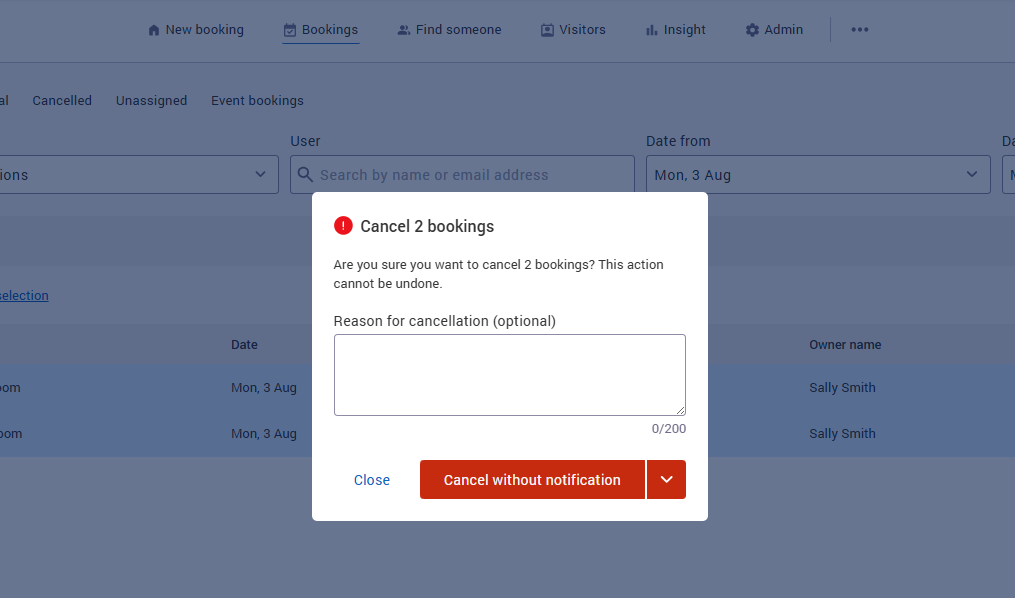
Location managers and admins can now provide a cancellation reason when cancelling multiple bookings in bulk. Colleagues whose bookings are cancelled will receive that reason via an email notification.
MS Teams online meeting enabled by default
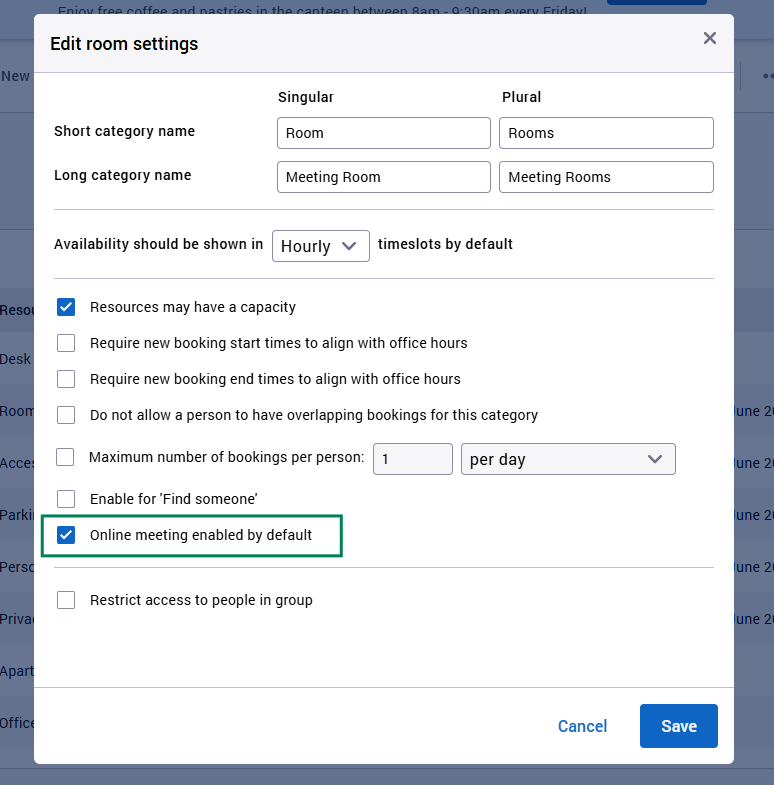
Organisation admins can configure meeting-room booking categories so the MS Teams / online meeting toggle is enabled by default when creating a booking. This removes the need for users to remember to turn it on each time — a common pain point for users who expect behaviour similar to Outlook.
A new option for admins, "Enable online meeting by default", has been added to booking category settings. It appears only for organisations with a conference provider (for example Microsoft Teams). When enabled, the 'Online meeting' toggle is pre-selected in the new booking page for resources in that category.
Accessibility improvements (headers)
We have made further accessibility improvements to the application header to better support users of assistive technologies:
-
The labels behind the Help button are improved.
-
Alt text for your organisations logo improved.
-
Alt text for the Matrix Booking logo improved.
Better handling of session token expiry
Previously the Web Application could, in some scenarios, leave customers stuck on a ‘loading spinner’ or encounter an error message when their session expired. Now, when this happens customers are automatically redirected to the login page so they can log in again without disruption.
Bug fixes & improvements
-
Fixed a visual issue where the top edge of a booking block in the day view overlapped the calendar gridline when the booking started on the hour.
-
Fixed a bug where card view search results with start time set to 'any' displayed duplicate resource cards.
-
2× high-severity security potential vulnerabilities patched.
-
Fixed a bug where low quality versions of images were being used when viewing them full screen.
Automatically load all bookings ‘awaiting approval’
Following customer feedback we have changed the default date range for the ‘Awaiting approval’ page so by default, all future bookings that need to be approved are displayed. We also now automatically load the page rather than the user having to click 'search' to see the results.
Changes to Matrix Booking Mobile Application
Improved frictionless check-in messaging
The messages shown when scanning a QR code for frictionless check-in are now more accurate and informative across different booking scenarios, so you always know what's happening.
"Nickname" renamed to "Preferred name"
The user profile field previously labelled "Nickname" is now called "Preferred name" which brings it in line with the web version and is more appropriate.
Improved push notification reliability
Push notifications (check-in reminders, visitor arrivals) have been rebuilt on a more robust foundation, improving delivery reliability on both iOS and Android.
iOS launch improvements
Updated the way the app launches on iOS to align with Apple's latest standards, improving reliability for SAML login, Microsoft login, Intune, and launching from push notifications or QR codes.
Android startup stability
Addressed an issue where some Android users could see a blank screen after launching the app.
Mobile Bug Fixes
Fixed error with unsupported device locales
Resolved an issue where availability checks could fail on devices running with an uncommon locale setting.
Supported OS Versions
The minimum supported version of iOS remains iOS 17.6 due to the embedded Microsoft Intune SDK, regardless of whether the app is managed by Intune. Note that the previous version of the app was configured to support iOS 15 but support was effectively limited to iOS 17 due to the embedded Intune SDK.
The minimum supported version of Android remains Android 9.
What's coming next?
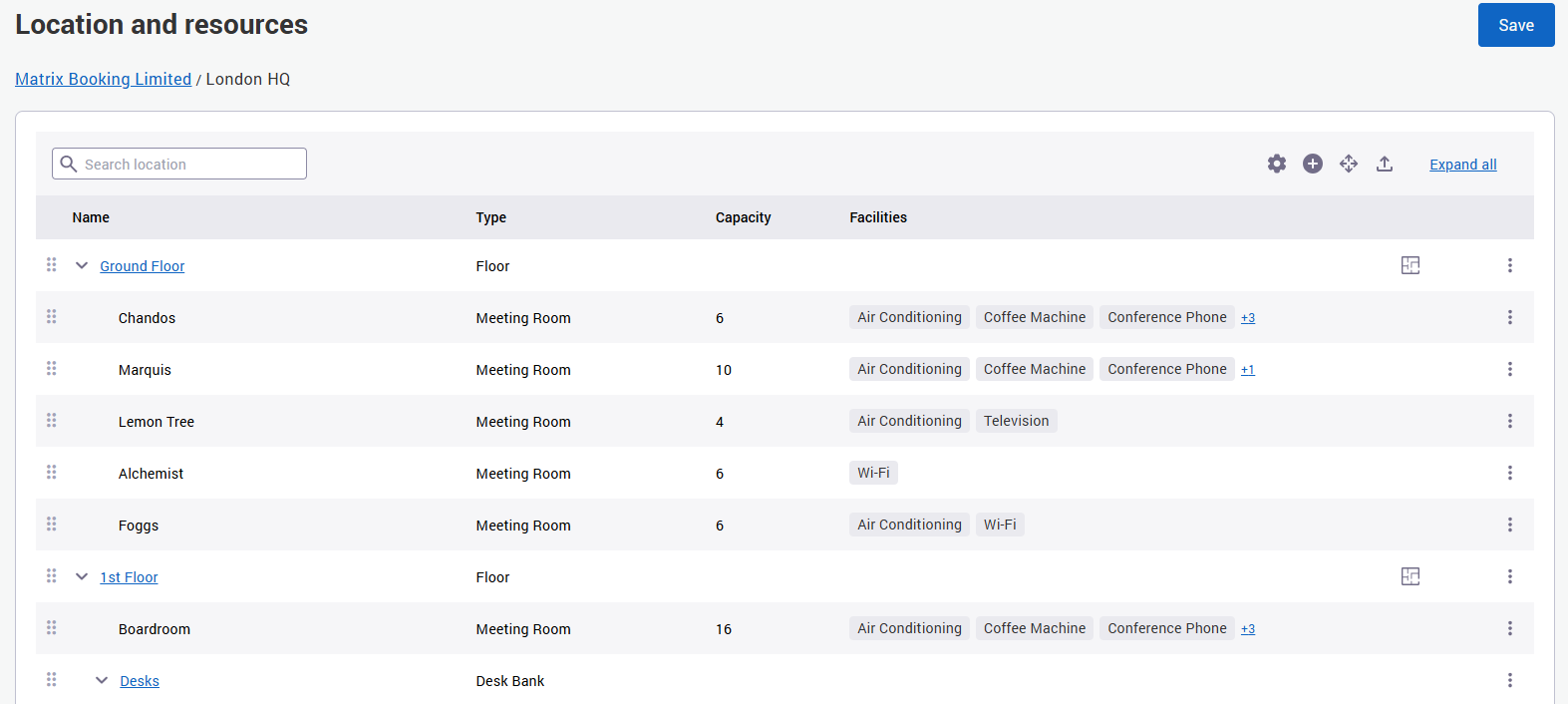
Improvements to the Locations & Resources administration screen
We're pleased to share that Matrix Booking is rebuilding the Locations & Resources administration screen. The redesign delivers a range of improvements for administrators:
-
Performance — faster editing and saving of hierarchies
-
Accessibility — improved accessibility compliance, including full functionality on smaller screens
-
Usability — a smoother experience when navigating hierarchies and moving resources
Importantly, all existing functionality will be retained, so there's no change to the features you rely on today — just a faster, more accessible way to work with them. Below is a screenshot of how the new version is currently looking:
We'll be in touch with further detail on timings and availability closer to release and once the new design is fully finalised.
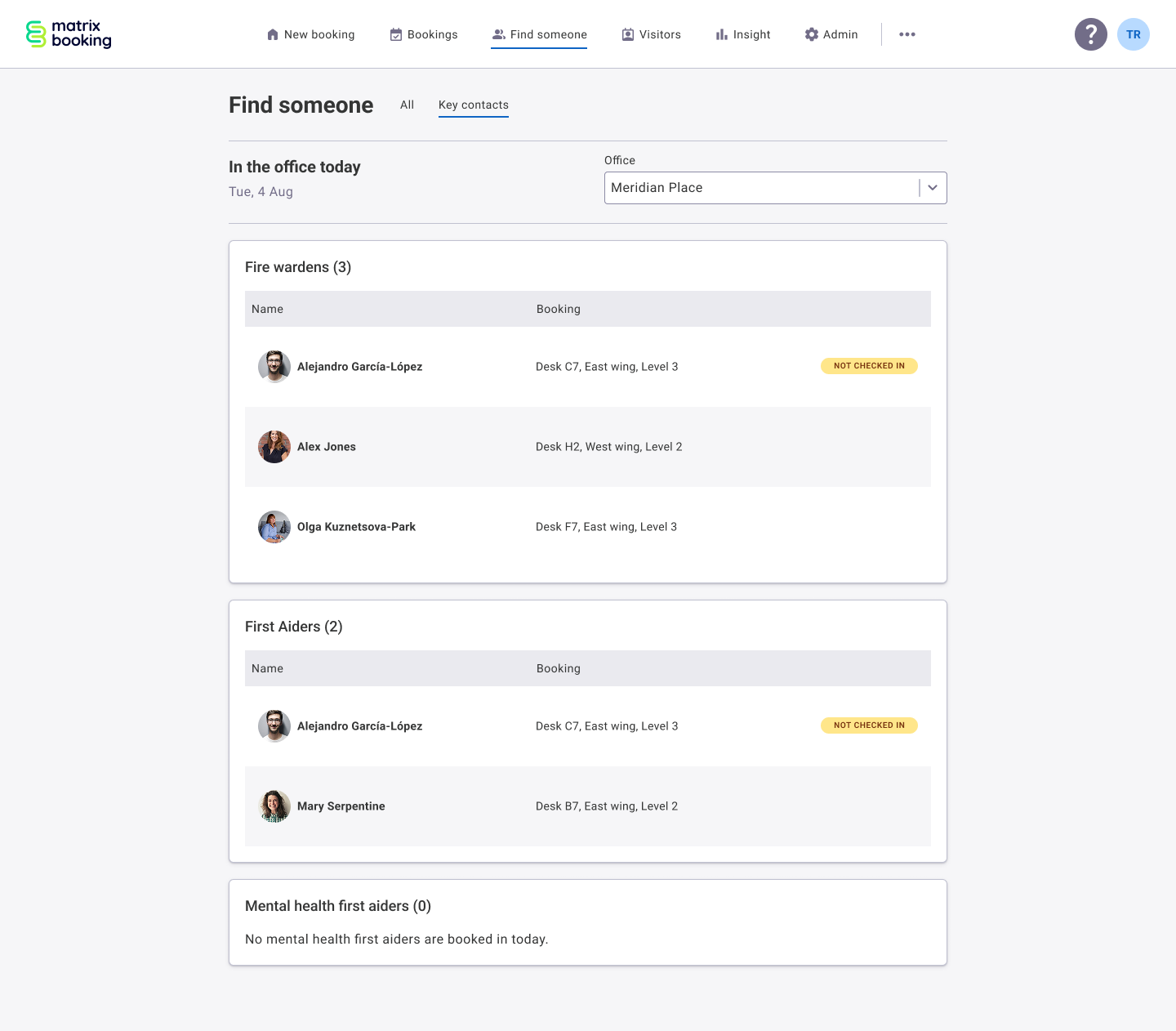
New workplace roles
Make it easier to find the right people, exactly when you need them. Workplace roles will allow organisations to create configurable roles, such as Fire Wardens, First Aiders or Mental Health First Aiders. Administrators can assign roles to users, or enable users to self-assign where appropriate. Colleagues will then be able to quickly locate people with specific roles and see where they’re sitting that day, helping improve safety, collaboration and day-to-day support across the workplace. As creenshot of how the design might look is shown below:
Customer webinar - recording now available
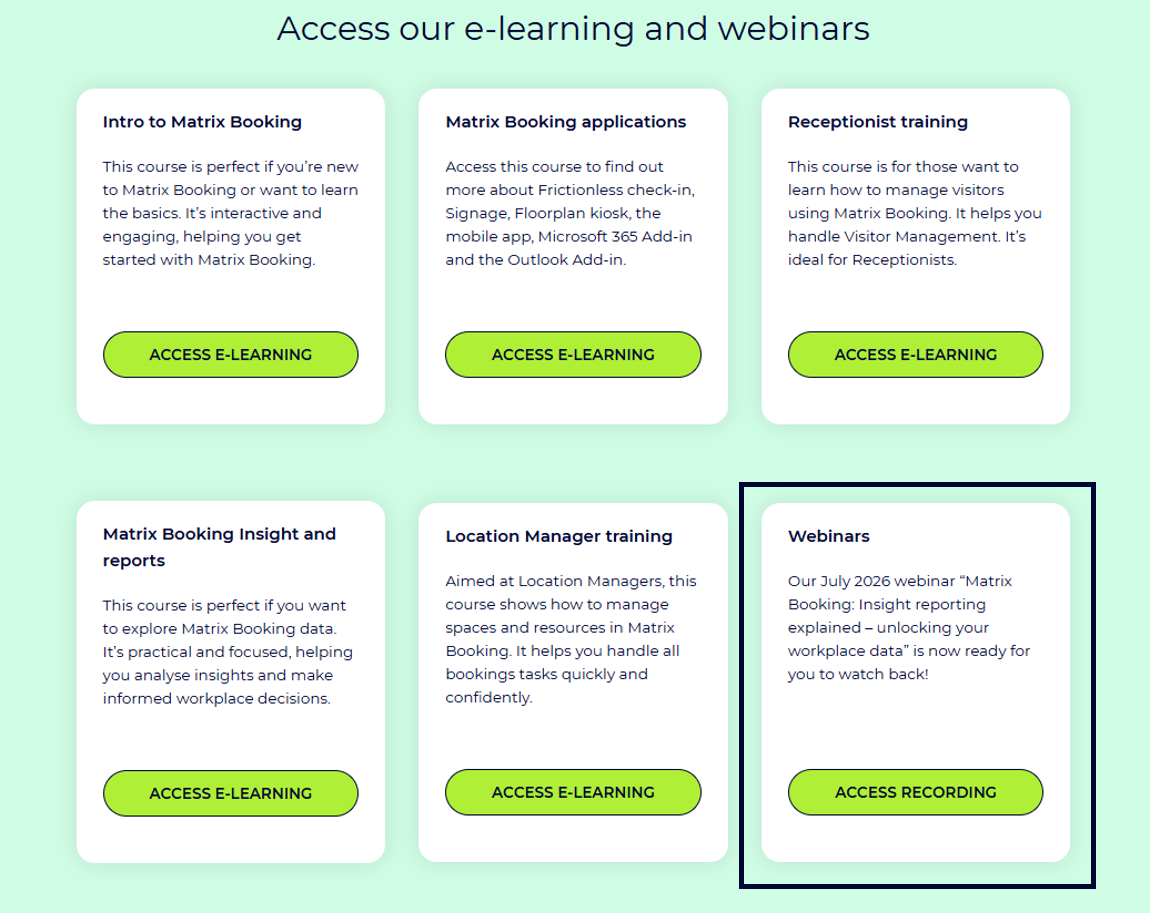
Thank you to everyone who joined our first quarterly customer webinar ‘Insight reporting explained - unlocking your workplace data - recording’. The session was a fantastic opportunity to connect with you all, showcase Matrix Booking Insight, share practical reporting tips, and answer questions live. We're pleased to say it was a great success, with valuable questions and engagement throughout.
If you missed the webinar, or would like to watch it again, the recording is now available on our e-learning hub. As a bonus, the recording also includes answers to all the questions we didn't have time to cover during the live session.
This is the first of the new quarterly webinars we have planned, and we're excited to continue bringing you product updates, expert guidance, and opportunities to get even more value from Matrix Booking.
Our next webinar will take place on Wednesday 21 October 2026. Registration details will be available on our Training Hub soon.
Where to find us next
Facilities & Estates Management Live: 20 – 21 October 2026 (Business design centre, London)
NHS Property 2026: 10th November 2026 (London)
To see the full list, head to the events area on our website.
Drop in session: Last month we also ran a ‘drop-in’ session for one of our customers - Transport for London (TfL). A few Matrix Booking colleagues set up a stand in one of the busy reception areas and spent a few hours talking to staff and administrators about Matrix Booking and sharing hints and tips on using our product, and also just listening to feedback. The session was very well attended and feedback has been excellent. If this is something you would like to also consider for your organisation then please reach out to your Customer Success Manager.
Supporting information
Please do ensure all of your administrators have access to our Support Portal to allow them to raise issues.
Here are some useful links:
-
Our Support Portal for guides, troubleshooting and raising issues.
-
Our Administrators guide for detailed instructions on how to amend and change settings.
-
Our Training Hub contains all our eLearning guides.
Why am I getting this email?
You're receiving this operational email because you're either a Matrix Booking Administrator or you’re registered with us as a key contact involved with Matrix Booking. If this isn't the case or you no longer wish to receive these updates, select the update your preferences link at the bottom of this email.
This is also the same contact list we use to advise of any system issues or service updates. If you fully unsubscribe from this, you'll unsubscribe from both types of email.
If you’re updating your workplace processes and rules or if you would like more information about anything in this email or our other products, contact us to see how we can provide help or support with those plans and using Matrix Booking in general.
Regards from everyone here at Matrix Booking,
Ian Jones
Chief Customer Officer