Welcome to our February 2026 product update.
Since the launch of the redesigned Matrix Booking app, many of you have taken the time to share what’s working well, what feels different, and where you still need more control or clarity. Thank you for that feedback. It directly influences how we prioritise and shape our product updates.
As you will see we have been extremely busy adding more features and improving those already there. This release includes a broad set of improvements across bookings, user management, and multi-tenant visitor management. You’ll also notice some changes aimed specifically at making administration simpler and more predictable.
After this update, we’ll be moving to monthly product update emails. Each one will focus on the most important changes, what they mean for you, and whether any action is required.
Below is a quick overview of what’s ready now, what’s coming shortly, and the resources available to support your teams.
So, what’s in this email:
Booking and calendar improvements
Book Microsoft 365–linked resources without a matching user
We’ve enhanced the Microsoft 365 and Matrix Booking integration to make booking shared resources more flexible.
Previously, if a user existed in Matrix Booking but did not exist in your Microsoft 365 tenant, they could not complete a booking for a resource linked to a 365 calendar. This often affected contractors, external users, or cross-organisation bookings.
With this update, those bookings can now proceed. Matrix Booking will create a resource-only booking in the Microsoft 365 calendar, ensuring:
-
The resource cannot be double-booked in 365
-
Calendar availability remains accurate
-
Cross-organisation bookings continue to work as expected
This setting is off by default.
Please raise a support ticket to have this setting enabled for your organisation.
Clearer guidance when creating repeat bookings
When an administrator creates a repeat booking that exceeds the forward booking limit, a warning message will now appear. The booking can still be completed if needed, but the warning provides clearer visibility and avoids unintentional policy breaches.

More calendar views in All bookings
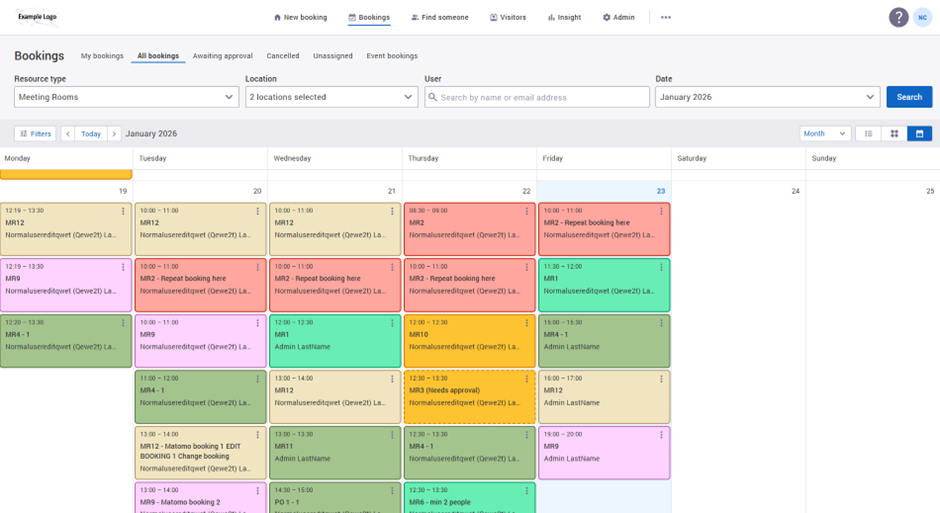
While the new schedule view has been well received, we heard consistent feedback from administrators who need more traditional calendar views to manage bookings and identify gaps.
You can now switch between schedule, day, week, and month views within the All bookings calendar view using the drop down selection at top right of the screen. These views also support moving bookings and creating new ones, making it easier to manage changes without switching screens.
Improved booking search across locations and resources
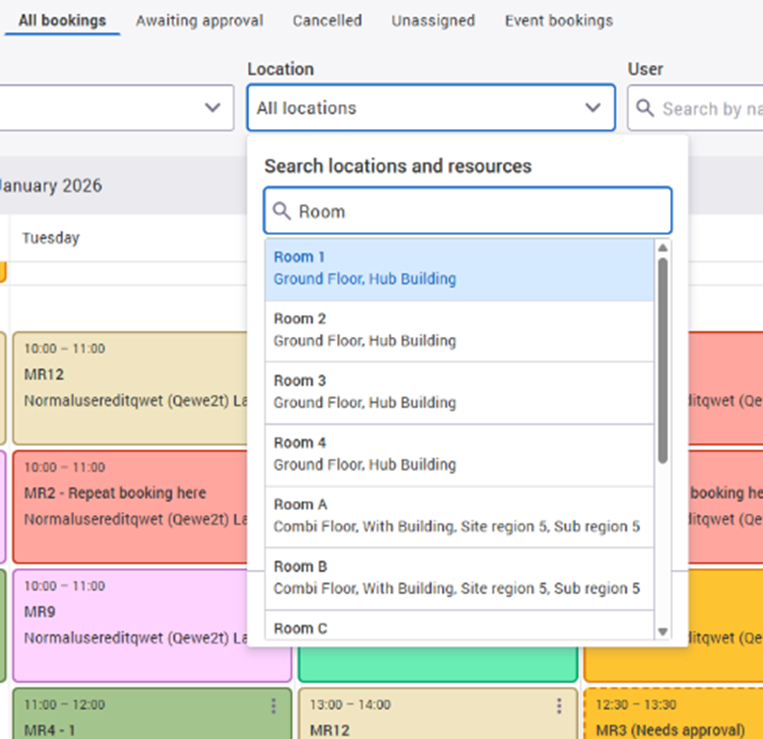
Bookings can now be viewed at every level, from the whole organisation down to a single resource.
You can also search for availability across multiple locations in a single search, which is especially useful for larger estates or hybrid working environments.
To avoid confusion, resource options are now filtered based on the selected location. This prevents searches for resources that do not exist at a given site.
Make resource options contingent on the selected location(s)
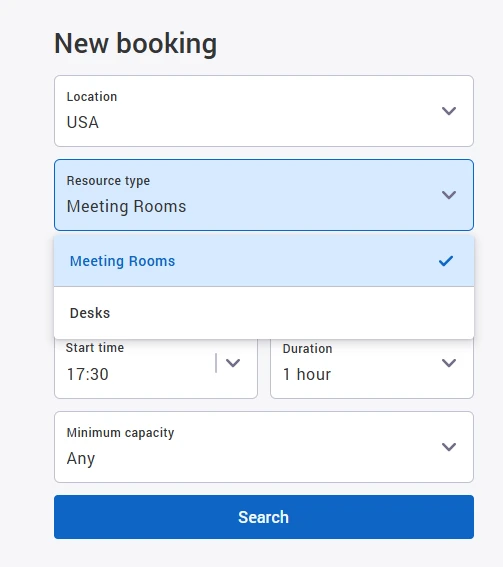
We received feedback that it was possible to select a resource and location combination that would never return results because the resource type was not available at that location. This was most noticeable in estates where certain resources, such as desks, were only configured in specific buildings.
To address this, we’ve updated the booking search so location is selected first. The resource types shown in the drop-down now automatically reflect what is available at the chosen location, helping prevent invalid searches and saving time.
Stronger admin visibility and user control
See where bookings come from
The booking history screen now displays the booking source, such as web or import. This information is also captured for check-ins, cancellations, and related actions, making audits and troubleshooting simpler.
Access depends on user role:
-
Standard users can see the booking source for their own bookings in the booking history tab.
-
Location Managers and above can see their own booking sources, plus the booking history and source for any bookings made in areas they manage.
-
Org Admins can see the booking history and source for all bookings across the organisation.
.png?cb=84818638cc35890a3be590f34e718d68)
Better management of locked and deactivated users
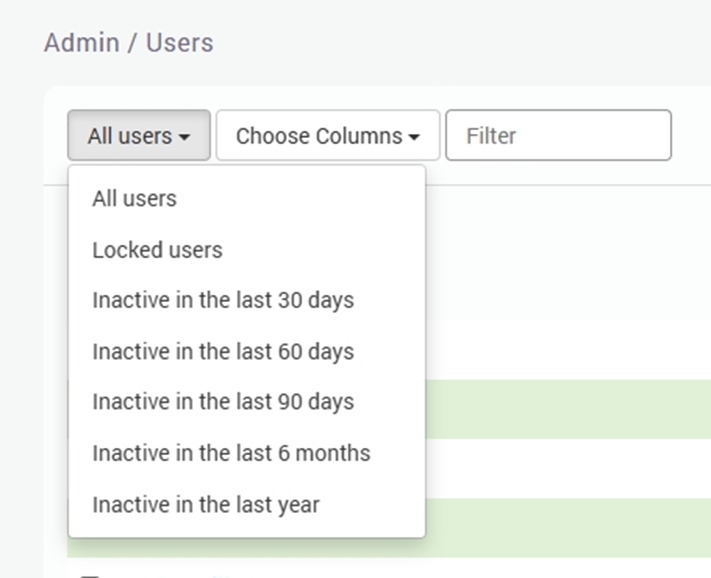
Several improvements have been made to help you manage inactive users more effectively:
-
You can now filter directly for locked users
-
Deactivated users can be automatically anonymised after a configurable time period
-
Deactivated users can be removed from groups and prevented from appearing in group searches
These settings give you more control while supporting GDPR and data retention policies.
Contact your account manager to enable these options.
Easier Hierarchy management
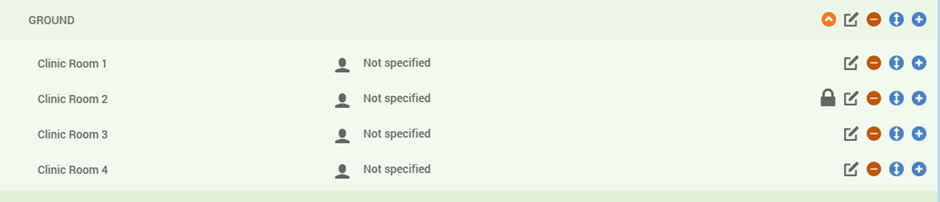
We’ve improved the usability of the hierarchy Move Tool. You can now invoke the move action directly from the location view using a new icon, reducing the steps needed to restructure your hierarchy.
This feature is not enabled by default, so please raise a support ticket to have this feature enabled. for your organisation.
Sense 1.0 retirement and next steps
Sense 1.0 has now been retired and replaced by Sense 2.0, our newer sensing platform. Sense 2.0 is designed to be more reliable and gives you access to newer sensor types and richer data.
All future improvements will be delivered through Sense 2.0. This allows us to focus on building new capabilities and ensuring the platform continues to perform well over time.
Sense 2.0 uses updated infrastructure that supports newer sensor technology, such as count sensors, and provides more detailed, event-based insights. If you are still using Sense 1.0 and do not yet have a migration plan in place, please contact your account manager to discuss next steps.
Multi-tenant visitor management enhancements
Simpler visitor settings
Visitor settings are no longer category-specific. Once a reception is enabled for a building, the same visitor settings now apply across all booking categories. This reduces setup effort and ongoing maintenance.
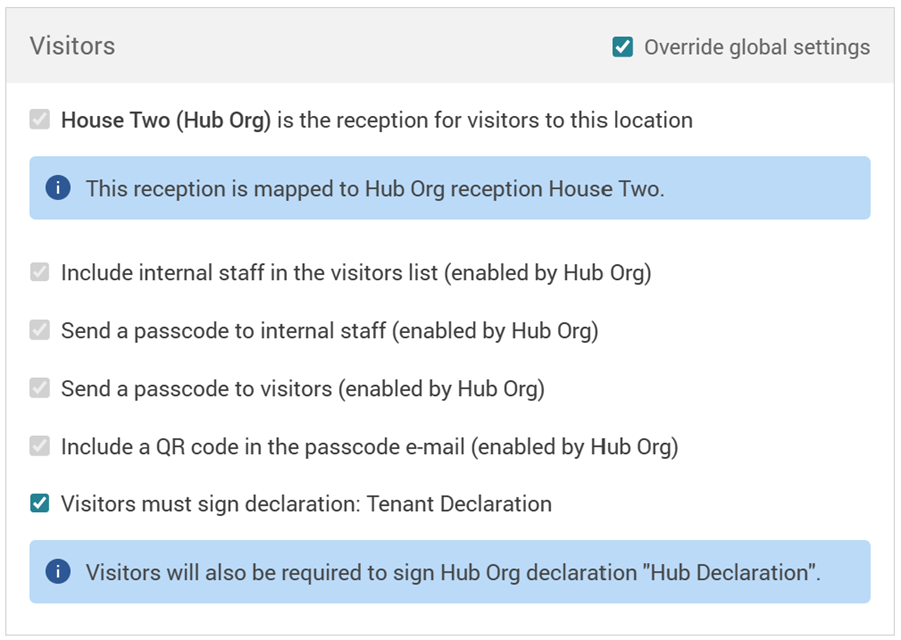
When a tenant reception is mapped to a hub reception and internal staff settings are enabled at hub level, staff will now be included automatically. QR codes and passcodes follow the same logic, with clear visibility in the Edit Location screen.
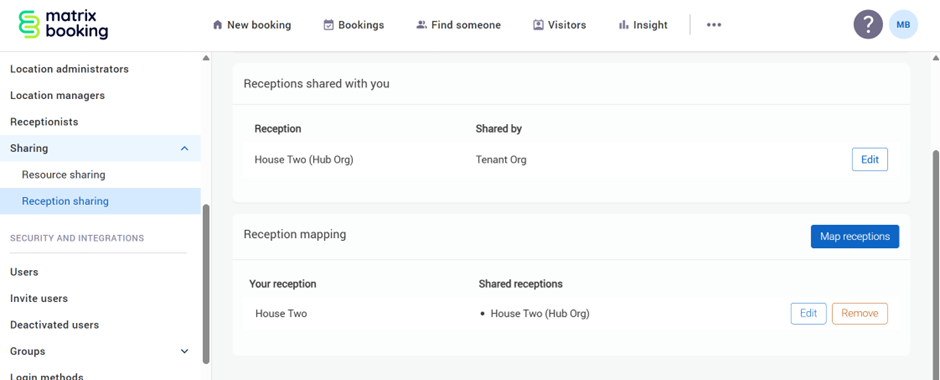
Clearer reception sharing setup
The Sharing Network screen has been redesigned to make reception sharing easier to understand and manage. It is now split into two distinct sharing types, helping administrators configure shared receptions with more confidence.
Upcoming visitor management multi-tenant enhancements
Over the coming months, we’ll be rolling out further multi-tenant improvements to visitor management across your organisation.
These updates will enhance the Add visitor experience and the Welcome app, making it easier to manage visitors across multiple tenants.
Once available, the updates will be applied automatically for all users who can access the visitor list within a hub organisation. There’s nothing you need to do.
What’s changing
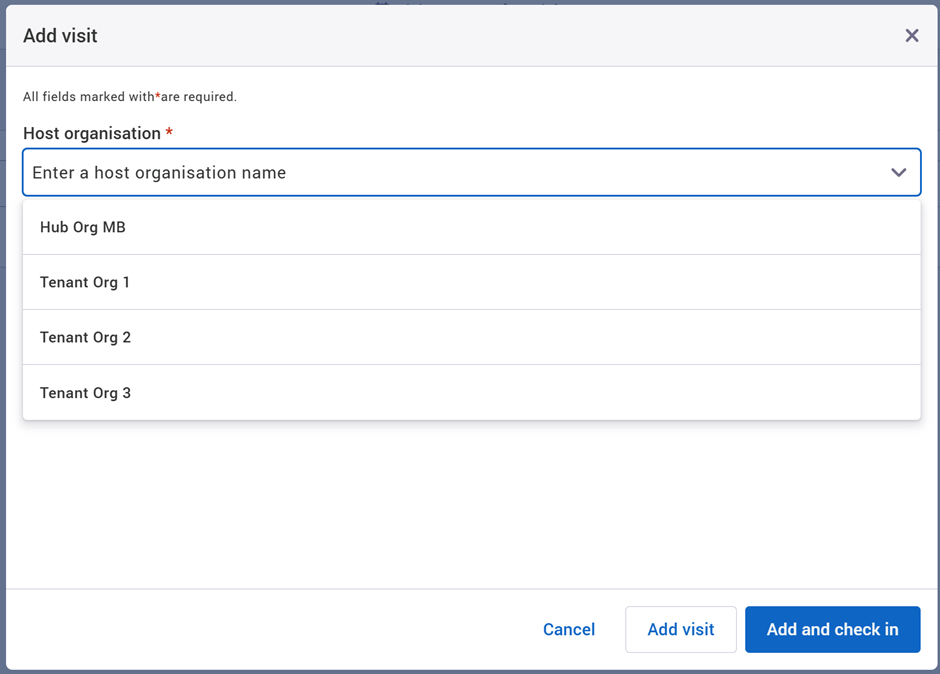
The Add visitor experience will be updated to better support multi-tenant visitor management.
If a receptionist has access to more than one reception, they’ll first select a location. They’ll then choose the organisation, or tenant, the visitor is attending.
After selecting the tenant, hub receptionists will be able to:
-
Search for hosts within that tenant organisation
-
Find existing internal or external visitors already stored in the tenant’s directory
-
Quickly create a new external visitor if they’re not listed
Any new external visitor will be automatically added to the organisation’s directory, making future visits quicker to manage.
More flexible visitor declarations
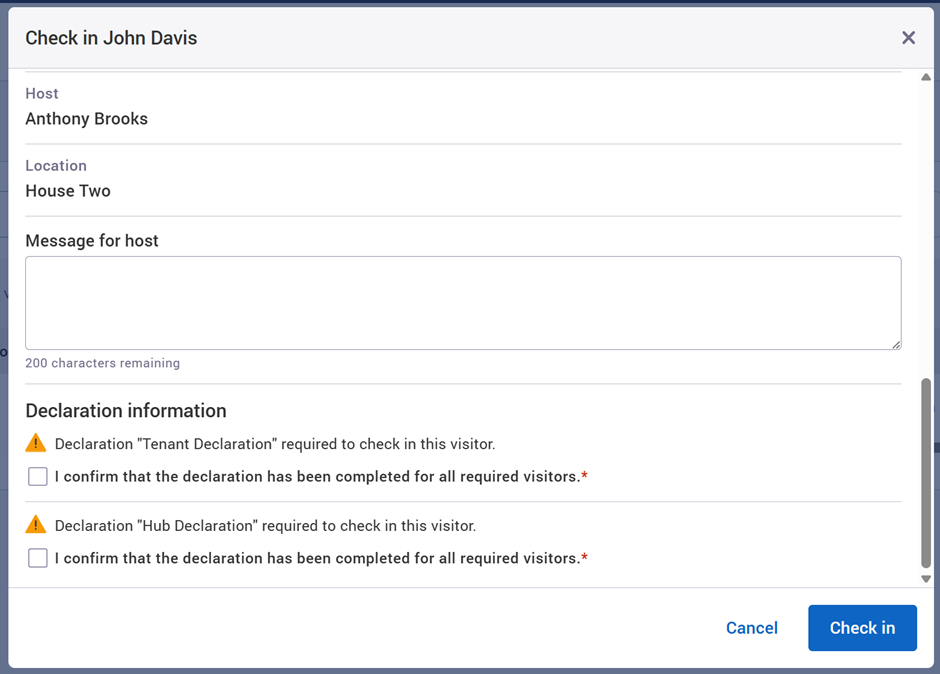
Both hub and tenant organisations can now enable their own visitor declarations for the same shared reception.
When both are enabled:
-
Visitors are clearly informed that multiple declarations are required
-
Declarations can be sent from both organisations
-
Receptionists can witness declarations during check-in, if enabled
This ensures compliance requirements are met without compromising the visitor experience.
Visitor list updates
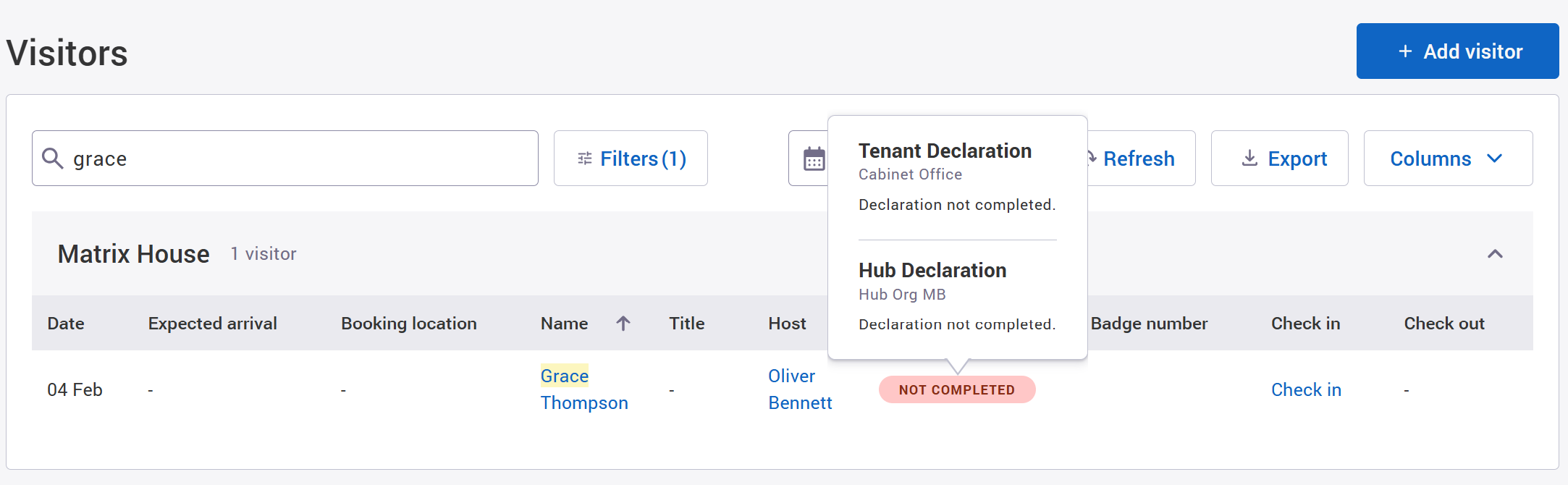
To make declarations easier to manage at reception, we’ve simplified how they appear in the visitor list. Status information is now clearer at a glance, helping reception teams move visitors through check-in more efficiently.
Welcome app updates for multi-tenant buildings
The Welcome app has been enhanced to better support shared receptions.
When arriving at a hub reception, visitors can now:
-
Select the organisation they are visiting
-
Enter their details as usual
-
Search for and select the correct host within that organisation
Check-in flexibility
All existing check-in options continue to be supported, including:
-
Multiple declarations - visitors can complete all required declarations directly in the Welcome app if they haven’t done so in advance
-
Visitor passcode/QR code emails can now be sent, controlled by either organisation. When enabled, these emails include a QR code to allow for fast, contactless check-in via the Welcome app. The Edit Location admin screen has also been updated so administrators can easily see whether the linked hub reception has the setting enabled.
Additional improvements
Event management
The Event bookings tab allows users to see a list of bookings that were created as a basket booking or event and manage all the bookings as a group.
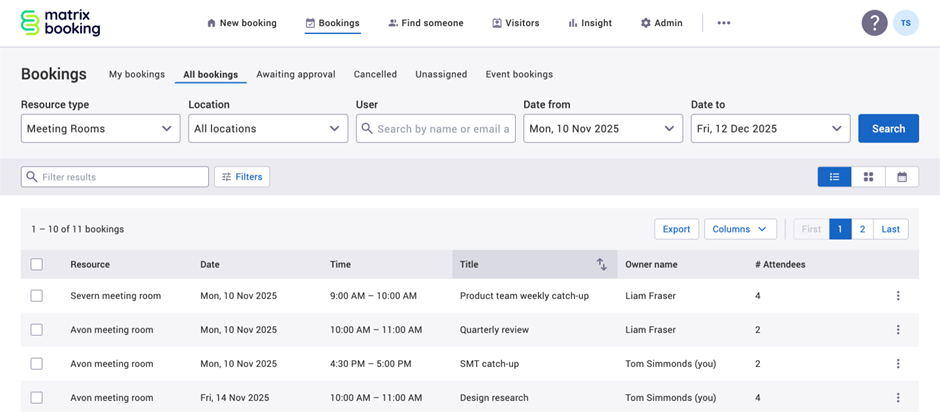
Table Column sorting
You’ll be able to order your bookings by selecting the table header for each column in either ascending or descending order.
Export from table views
Location managers, location administrators, and administrators can export booking from My bookings, All bookings, Awaiting approval, Cancelled, Unassigned, and Work Requests. This can be done from the table view of each Booking screen tab. Providers can also export Work requests.
Search for availability across multiple locations
For users that want to search for things in more than one place, it’s now possible to select multiple locations in the new booking search form.
Insight access for location roles
Location managers and location administrators can now access Insight directly from the main navigation. This makes it quicker to view reports and dashboards without needing a direct URL.
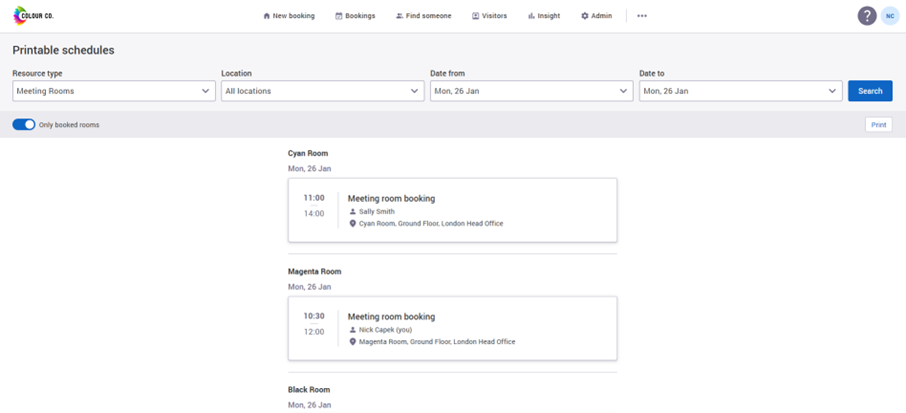
Printable schedules
Formerly known as ‘Daily Printed Agendas’ - this feature allows users to print a list of all the bookings for a room for a given day and stick it on the wall outside the room.
Printing work requests
Facilities and catering teams can now print daily work requests directly from Matrix Booking. This supports teams who prefer or require printed task lists to manage their work on site.
All bookings default view
If your organisation is configured to default to All bookings, users will now land there automatically when they log in. This ensures a consistent starting view across the organisation and avoids confusion caused by legacy user-level settings.
View-only booking details
Users with view-only access can now see booking options such as catering or services. This is particularly useful for service providers reviewing bookings through work requests.
Capacity warnings
When the number of attendees exceeds a room’s capacity, users will now see a warning message. The booking can still proceed, but the warning helps prevent accidental breaches of room limits.
Useful resources
Our Training Hub and Support Portal have been updated to reflect these changes and the redesigned Matrix Booking experience.
Meet the Team
Where to find us next:
Government Property 2026 - 4th February 2026 (London)
The Workplace Event 2026 - 28 to 30 April 2026 (NEC, Birmingham)
AUDE annual conference - 20 to 23 April 2026 (University of Leeds)
Local Authority Property and Estates 2026 - 30th April 2026 (Manchester)
To see the full list, head to the events area on our website.
Supporting information
Please do ensure all of your administrators have access to our Support Portal to allow them to raise issues. Here are some useful links:
Our Support Portal for guides, troubleshooting and raising issues.
Our Administrators guide for detailed instructions on how to amend and change settings.
Why am I getting this email?
You're receiving this operational email because you're either a Matrix Booking Administrator or you’re registered with us as a key contact involved with Matrix Booking. If this isn't the case or you no longer wish to receive these updates, select the update your preferences link at the bottom of this email.
This is also the same contact list we use to advise of any system issues or service updates. If you fully unsubscribe from this, you'll unsubscribe from both types of email.
If you’re updating your workplace processes and rules or if you would like more information about anything in this email or our other products, contact us to see how we can provide help or support with those plans and using Matrix Booking in general.
Regards from everyone here at Matrix Booking,
Ian Jones
Chief Customer Officer