
Welcome to Admin-as-a-Service (AaaS) — we’re really pleased to have you on board.
This welcome pack is designed to help you get started quickly and understand how to get the most value from the service.
What is Admin-as-a-Service?
Admin-as-a-Service gives you direct access to our experienced admin team to handle day-to-day Matrix Booking administration on your behalf.
Think of us as an extension of your team — here to take care of routine admin tasks so you don’t have to.
What you can ask us to do
You can use Admin-as-a-Service for tasks such as:
-
Creating or updating buildings, floors, and resources
-
Managing users and administrator access
-
Applying or updating business rules
-
General configuration changes and ongoing admin maintenance
If you’re ever unsure whether something is covered under AaaS, just ask — we’re happy to advise.
What’s included / What’s not (quick reference)
✅ Included
Admin-as-a-Service is ideal for:
-
creation and maintenance of user groups, permissions, and individual user roles
-
management of any users within the Matrix Booking directory
-
realignment of users that may be in other organisations
-
maintenance of all resource business rules and settings
-
configuration of any functionality and features we provide
-
onboarding and off-boarding of new sites, buildings, locations, and additional resources
-
configuration of your hierarchy (for example, buildings, floors, rooms, or other resources)
-
configuration of other Matrix Booking applications (for example, Matrix Sense)
-
running of any standard reports available within the system
❌ Not included
Admin-as-a-Service does not replace:
-
end-user support queries (e.g. “How do I make a booking?”)
-
training or onboarding sessions
-
bugs, incidents, or system outages
-
new feature requests or product enhancements
-
integrations
-
setting up Cross org sharing networks
-
design or redesign of floor plans (we have another service for this)
-
running reports that aren’t available in Matrix Booking
-
all non-office hours work (outside Monday to Friday 08:00 AM – 6:00 PM, except public holidays) would be considered out of scope and would be charged extra if this were required (this charge depends on the scope of the work – contact your Account Manager to discuss this)
If something falls outside Admin-as-a-Service, we’ll let you know and guide you to the right support path.
How to raise a request
Raising an Admin-as-a-Service request works just like raising any other support issue:
-
Visit https://support.matrixbooking.com or raise directly from within the Web Application
-
Log in to the support portal
-
Select Admin as a Service Request
-
Tell us what you’d like us to do
Our team will pick up the request and get started as quickly as possible. Most requests are completed very quickly, and if we need clarification or there’s any delay, we’ll let you know straight away.
Need something quickly? Use Support Chat
For quick questions or simple requests, you and your administrators also have access to Support Chat — a real-time chat option available directly in Matrix Booking.
-
Average response time: ~30 seconds
-
All chats answered within five minutes
-
If something needs more work, we’ll turn the chat into a support ticket for you
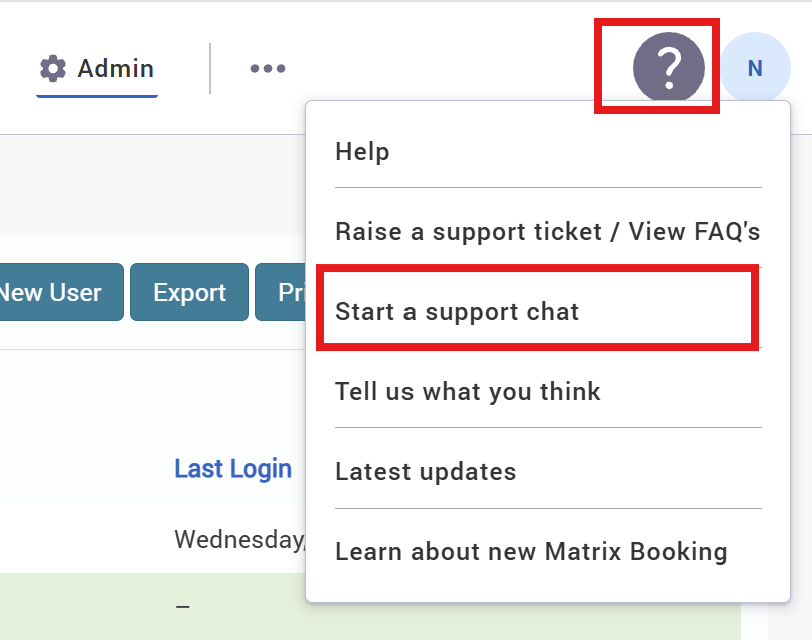
To access support chat, simply log in to Matrix Booking, in the top right of the screen there is a ‘Question Mark’ icon. Click here to open your ‘Help’ options. Select ‘Start a support chat’.
Your first steps (recommended)
To get the most out of Admin-as-a-Service, we suggest:
-
Raising your first request to familiarise yourself with the process
-
Letting your internal admins know they can use Support Chat
-
Using AaaS for routine changes to save internal time
We’re here to help
Our goal is to make managing your Matrix Booking environment easier and more efficient. If you have questions at any point, just raise a request or start a chat — we’re here to help.
We look forward to supporting you.