
Here's what's new in Matrix Booking
This month, we’ve launched Private Bookings and we're aiming to launch Hybrid Work Schedules which will see some changes to the main navigation at the top of the page in Matrix Booking. See below for further details, but as the volume of new features and improvements continues to grow, we would encourage you to read these updates and share the changes with your teams.
We would also take this moment to remind you that we have a customer webinar this week where we will focus on Groups and teams but will also give an overview of the other changes mentioned in this update, so please do register for that (link below).
If you'd like more details on any of these updates, please reach out to your Customer Success Manager.

So, what’s in this email:
1. Private Bookings
With the rollout of our latest update, users can now mark room and desk bookings as Private directly within the web app and integrated calendar workflows.
Key Capabilities
-
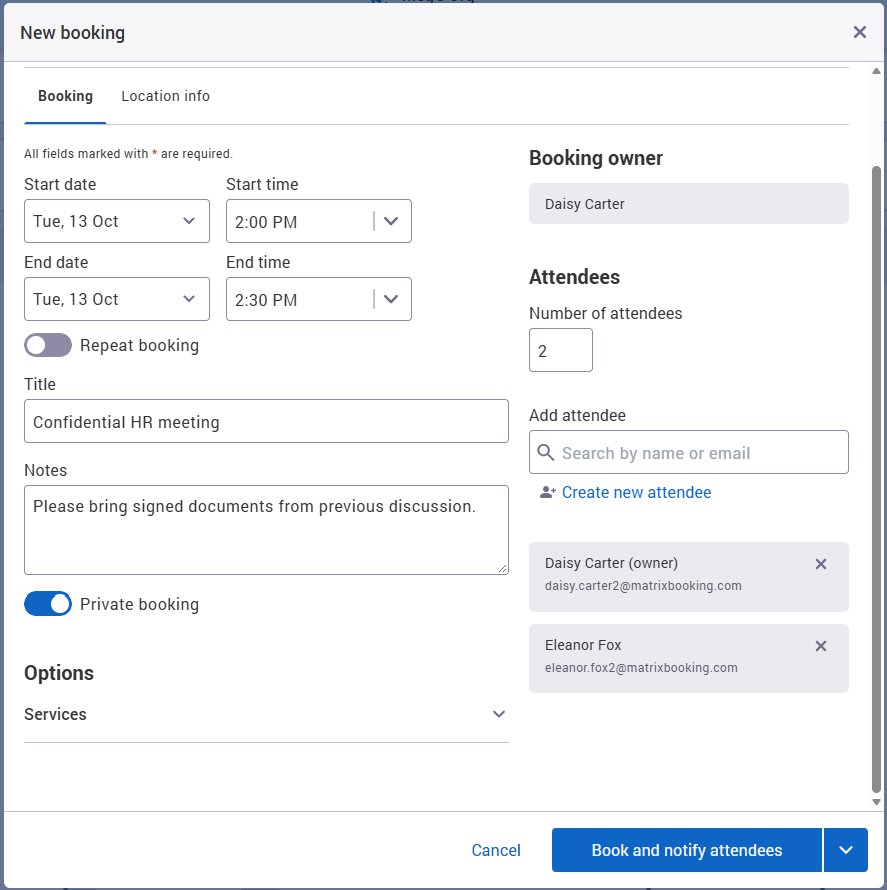
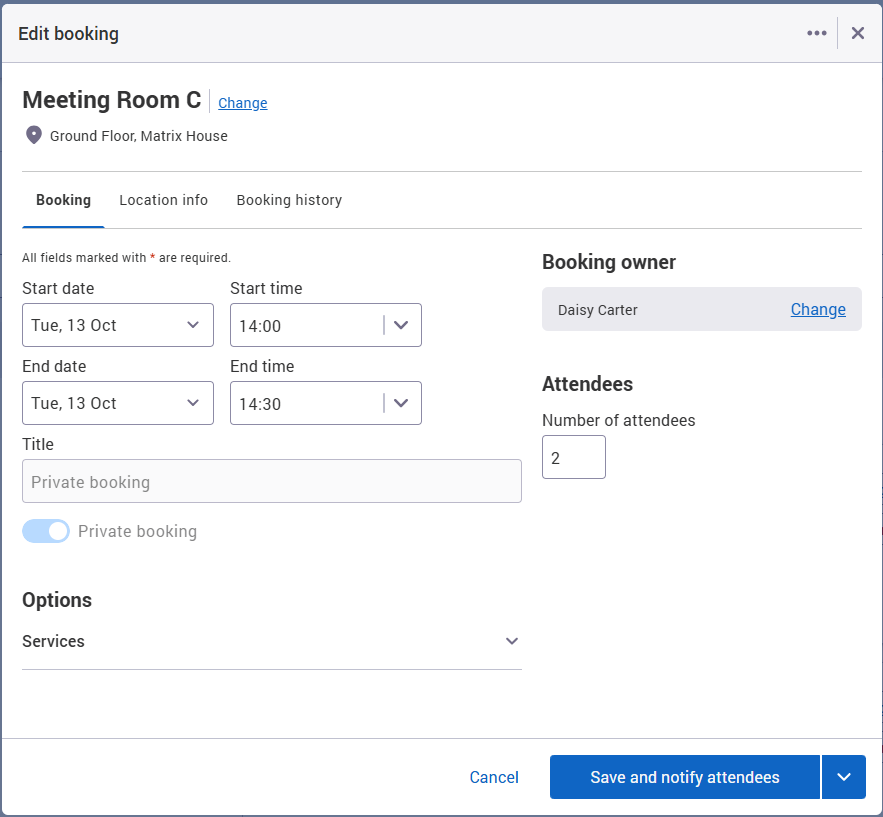
Privacy Controls: When a booking is marked as private using the switch on the booking form, sensitive details such as the meeting title, notes and attendee lists are masked from other users in the bookings screens, floor plans, and search results.
-
Preserved Space Occupancy: The room or desk remains marked as busy/unavailable during the booked time slot, preventing double-bookings while maintaining confidentiality.
-
Microsoft 365 (Outlook) Sync: For organisations with the Microsoft 365 integration we now have full two-way synchronisation with Microsoft 365 privacy flags. Meetings marked private in Outlook reflect as private in Matrix Booking, and vice versa.
-
Digital Signage & Arrivals Protection: Room signage screens and kiosk displays automatically display "Private Meeting" rather than exposing confidential meeting subject lines.
-
Location Manager Override: Location Managers and System Administrators retain the operational ability to view booking times, relocate, or adjust bookings for facilities management without exposing private details.
Booking owner view:
User who is not booking owner or attendee:
This feature is off by default. If you'd like it enabled for your organisation, please raise a support ticket with our team.
2. Mobile app now includes ‘People’ section
Finding colleagues is easier in the mobile app (if enabled for your organisation).
A new People section is available at the bottom of the app’s main screen. From here, you can:
-
Search for colleagues quickly and easily
-
See where your colleagues have bookings today
It’s a simple way to find and connect with colleagues while you’re on the go.
In addition to adding Find Someone to the mobile app, we have launched it with the ability to find key people (the new Workplace Roles) on mobile too.
3. Recent cyber security vulnerability
You may have recently seen news regarding a newly discovered security vulnerability affecting certain versions of PHP. We want to reach out to assure you that your data and our platform remain secure.
Our infrastructure team was alerted to the vulnerability as soon as it was announced and we confirmed that there was no exposure to core platform and customer data. We also reviewed our sub-processors and assessed them for potential risks.
We want to confirm the following details regarding our platform security:
-
Exposure: The Matrix Booking platform was not affected and exposure was limited to the marketing website only (there is no customer data there and no link to customer data in any way).
-
No Impact Detected: We have found absolutely no evidence of unauthorised access, exposure, or suspicious activity within our network related to this vulnerability.
-
Our Systems Are Patched: Sub-processors who were affected have confirmed their systems are patched, and we can confirm our marketing website has been patched.
We treat infrastructure vulnerabilities with the highest severity to ensure your business operations and data remain completely safe and uninterrupted.
Our team will continue to monitor the situation closely. If you require further technical details regarding our patch validation process, please contact your account manager or our support team.
4. Minor updates and bug fixes
Improved Location & Space Search
-
Smarter Punctuation Handling: Location search across the hierarchy now recognises brackets
(), hyphens-, and slashes/as word separators. -
Better Discoverability: Searching for terms like
Eastwill now seamlessly find locations named "Meeting Room (East)" or "Suite A-East", ensuring spaces with zone, wing, or room-type qualifiers are much easier to find.
Calendar Integration & Sync
-
Microsoft 365 Resource Cancellation Cleanup: Fixed an issue where resource-only bookings rejected in Matrix Booking (such as those conflicting with buffer times) were not cleanly removed from the connected Microsoft 365 calendar.
Security Hardening & Maintenance
-
Routine security maintenance and proactive library upgrades (addressing third-party dependency advisories) to ensure ongoing platform stability and data protection.
5. What's coming next?
5.1 New Signage app is coming soon
In the coming months, we’ll be rolling out a new Signage application on every Matrix Booking signage device. This is a required upgrade for all devices, so it’s worth starting to plan for it now.
We rebuilt the app around what customers have told us they need from the screens outside their rooms. It’s simpler to use, works better with your security setup, and is easier to manage. Here’s what’s changing.
Sign-in that works with your security setup
The new app signs in using short-lived tokens, so no password is stored on the device. For actions linked to a person, such as an authenticated booking or a check-in, people can sign in with your organisation’s single sign-on (SSO) or with two-factor authentication. Each action is recorded against the person who took it. Walk-up bookings stay anonymous by design. All of the existing options around anonymous bookings, or assigning to staff by selecting from a list will continue to be supported and be unchanged. This just gives more / additional options for those that want to enforce log in to make bookings.
Sign in with your phone
Entering a password on a shared touchscreen isn’t easy for everyone. Wherever someone needs to sign in, the panel shows a QR code. They scan it, and sign-in happens on their own phone. The code only appears when phone sign-in is available, so nobody scans a code that doesn’t work. This makes the panel easier to use for more people. Again, giving this option will be a choice administrators make and if you prefer to not give these additional options, thats fine too.
Your branding, managed remotely
You can set a light, dark, or automatic theme, show or hide the room name, and use your own words for resources, such as “space” instead of “room”. You can change all of this remotely, without visiting the site. If a panel goes offline, a technician can run network diagnostics from the panel’s offline screen.
We’ll confirm rollout dates well ahead of time, and your account manager will help you plan. If you have questions in the meantime, contact your Customer Success Manager or Account Owner.
5.2 Hybrid Work Schedules
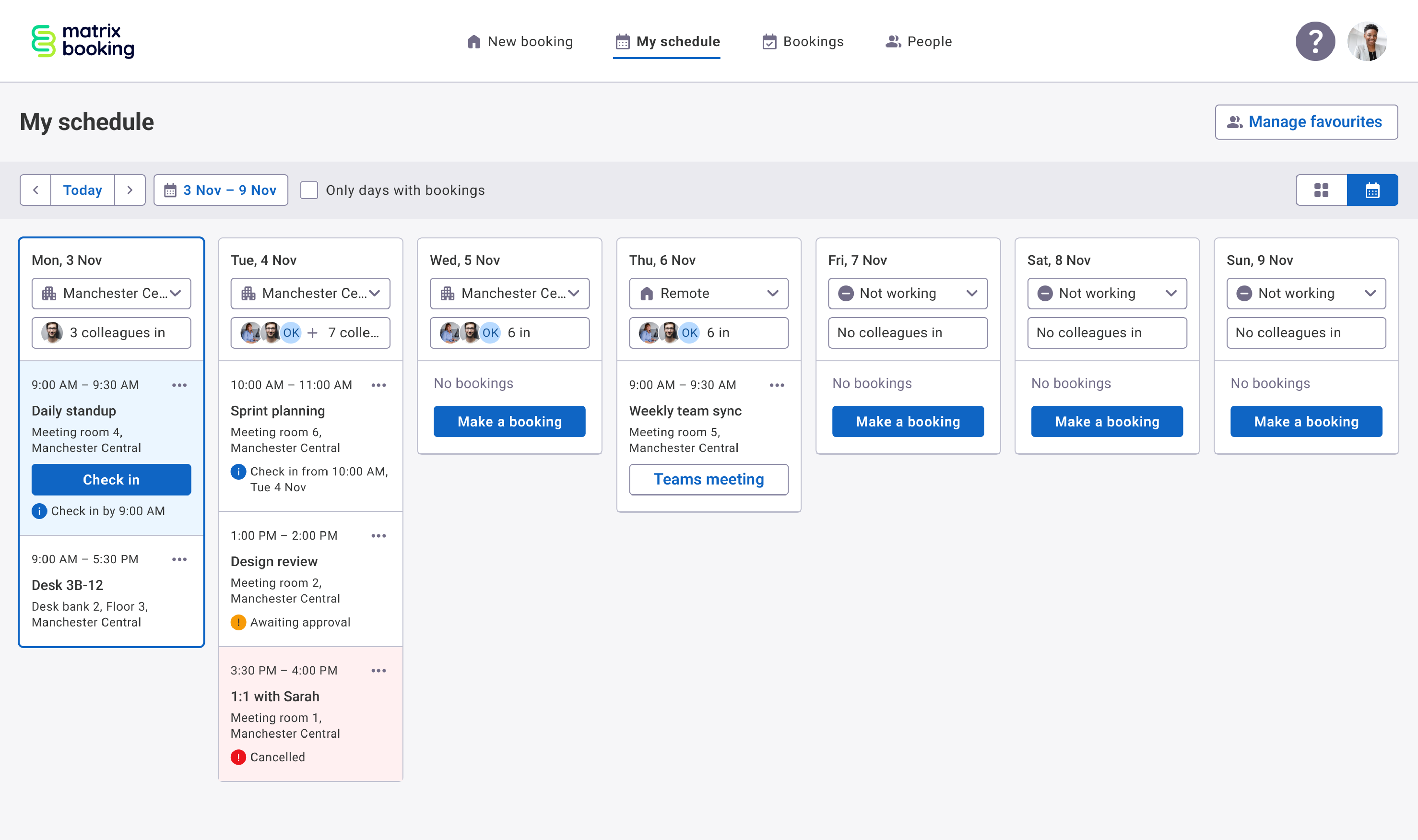
We're empowering hybrid workers with personalised weekly work schedules, making it easier to book spaces and coordinate in-office collaboration with colleagues.
Users will be able to set their default weekly hybrid work schedule, indicating whether they're working remotely, in the office, or not working, and choose whether to share this information with colleagues.
From the new “My Schedule” view, users will see when colleagues plan to be in the office alongside their own work schedule and bookings, helping teams coordinate their time more effectively.
We're also adding support for profile pictures, making it easier to identify colleagues and quickly see who's planning to be in the office.
This update will also introduce the new People section in the main header navigation which replaces what was “Find someone” for those organisations with it enabled. People will be where you can access Find someone, Favourites and Key People going forward.
We’re putting the finishing touches onto these exciting new features and expect to make it available to you from the 29th of October.
6. Customer webinar - Groups in Matrix Booking
Join us on 28 October 2026 to discover how groups and teams in Matrix Booking can help you create a more personalised, efficient, and controlled workplace experience.
As well as taking you through all of the recent features we have released, and whats coming up in the next releases, we’ll focus then on how you can use groups and teams to create powerful business rules and even more insightful reporting. We'll demonstrate how organisations use groups to manage access to desks, rooms, parking, and other resources, reducing manual administration and ensuring the right people can access the right spaces at the right time. You'll learn practical ways to support hybrid working, reserve resources for specific teams, improve governance, and deliver a smoother booking experience for employees. Through live demonstrations, best practice guidance, and real-world examples, you'll leave with actionable ideas that can save time, increase adoption, and help you get more value from your Matrix Booking platform.
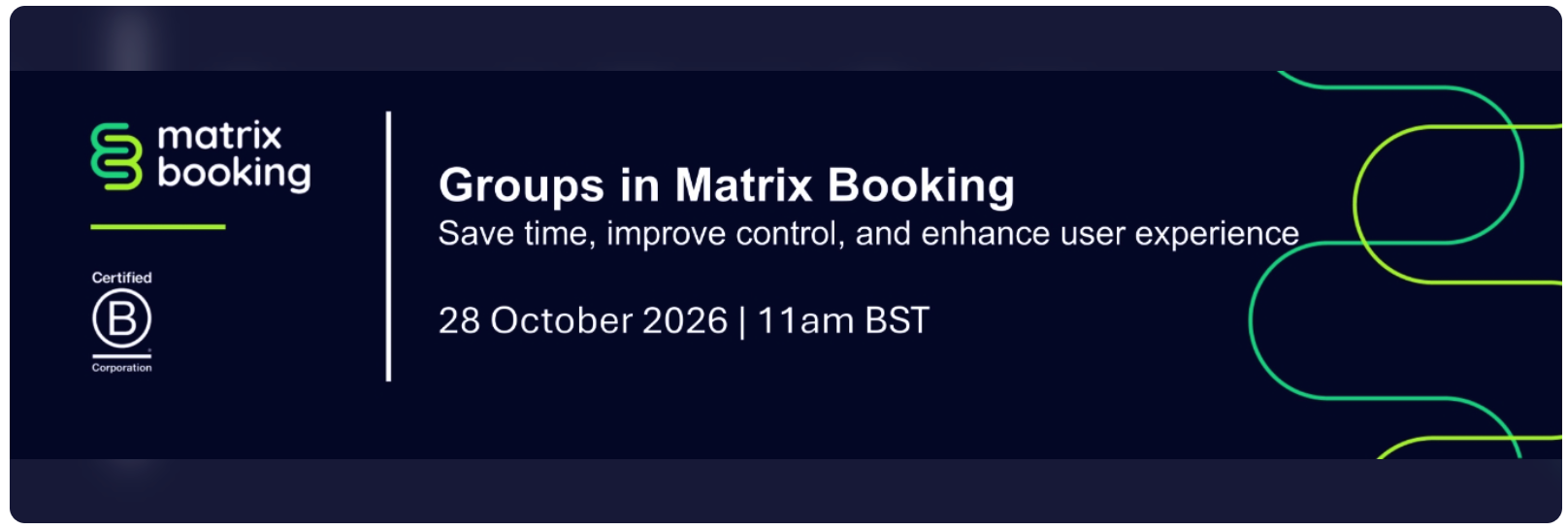
Register now for this webinar which ill take place on Wednesday 28 October 2026.

If you missed the previous webinar, or would like to watch it again, the recordings are available on our e-learning hub.
7. Product Roadmap
We’re always working to make Matrix Booking better for you. Much of what we build starts with feedback from customers like you, so we wanted to show you what’s coming.
Here’s our latest product roadmap. It shows what we’re building now, what we’re planning for early 2027, and where we’re heading after that.
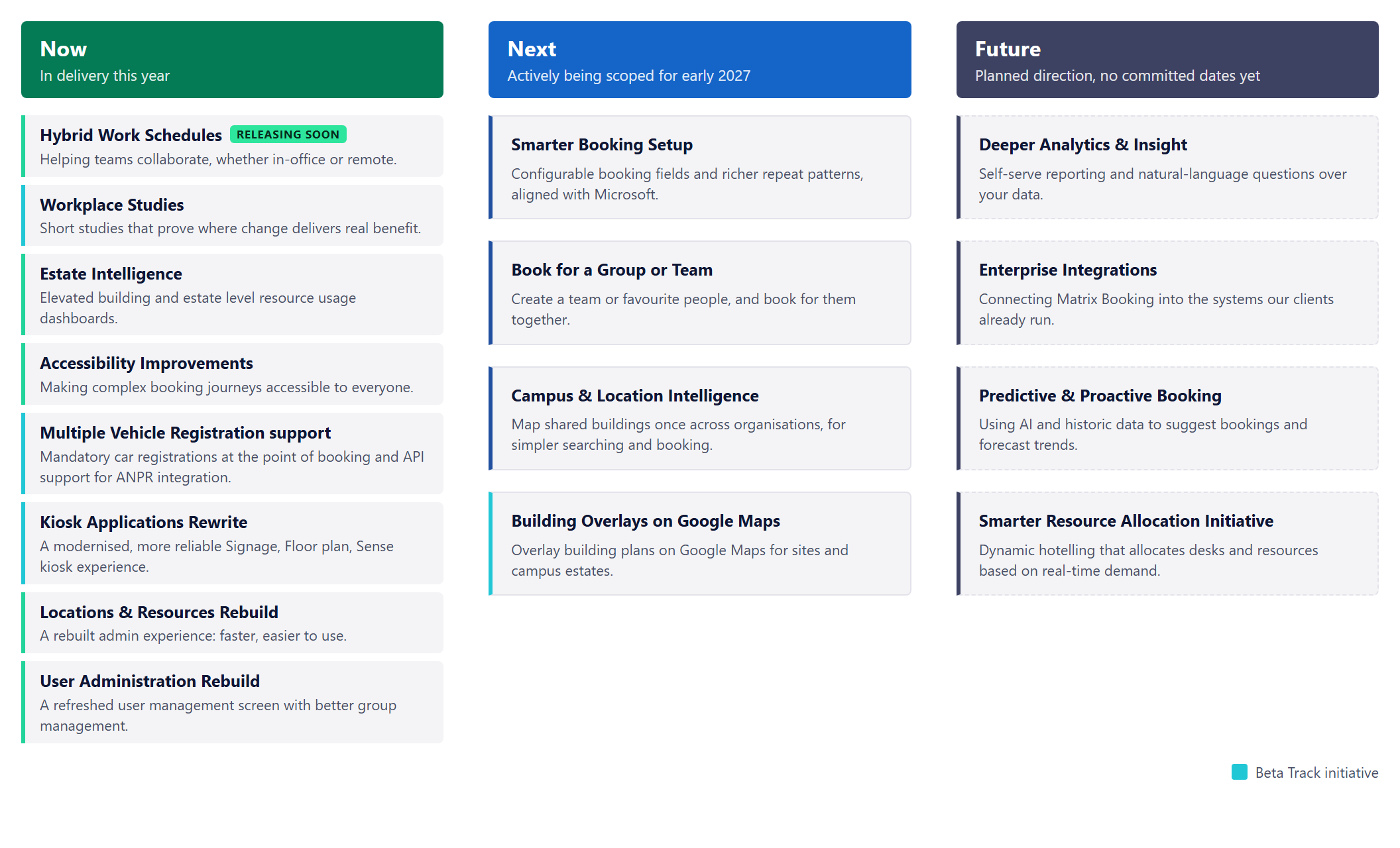
See something you're curious about or have an idea for a new feature? Get in touch with your Customer Success Manager or Account Owner and we'll set up a call or a visit to talk it through.
8. Where to find us next
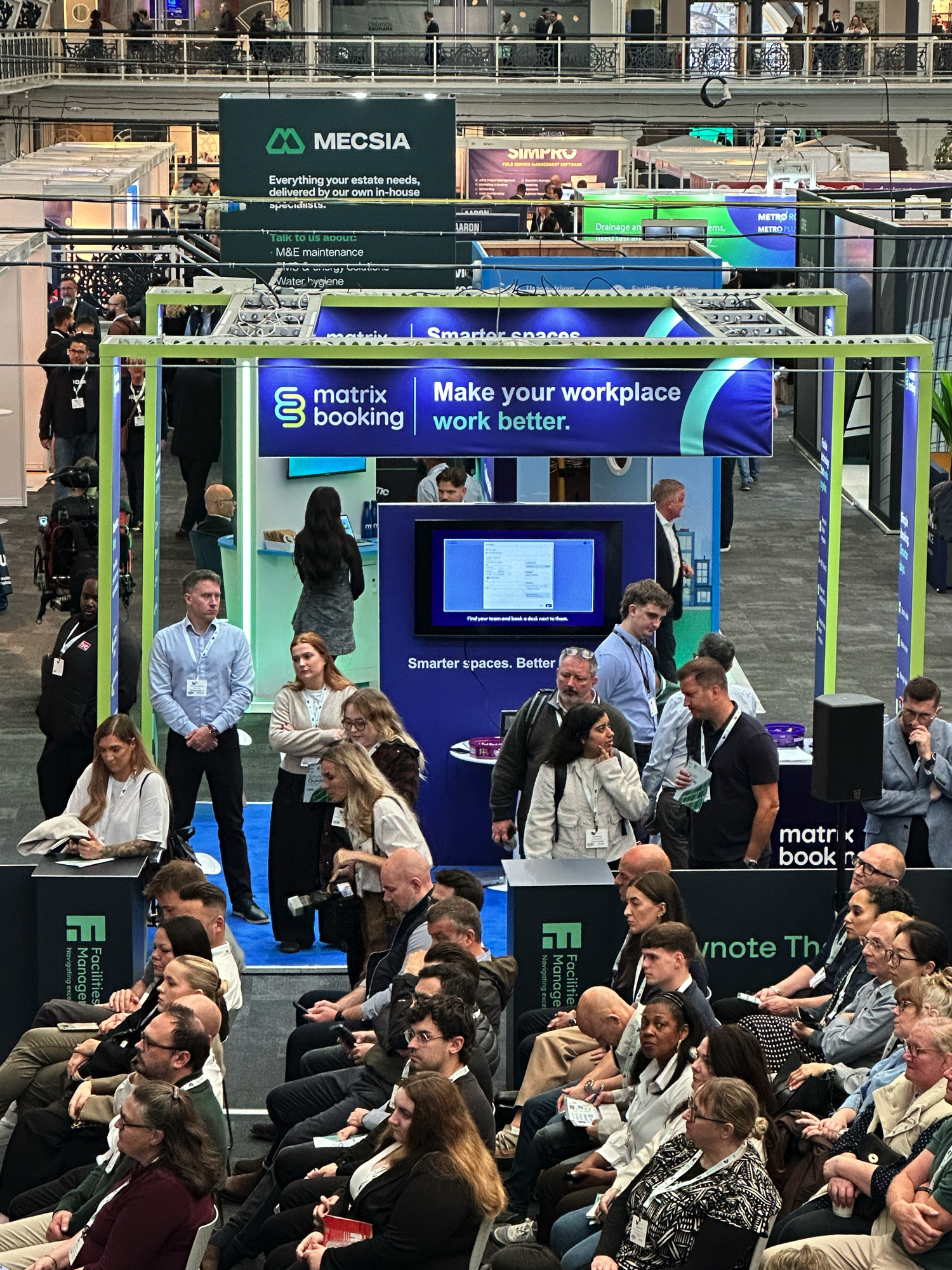
Last week we attended Facilities & Estates Management Live in The Business Design centre, London. It was an extremely busy and popular event and a great opportunity to meet with a number of our existing customers, partners and potential new customers.
NHS Property 2026: 10th November 2026 (London)
To see the full list, head to the events area on our website.
Customer visits: We love seeing our product in action with our customers. If you'd like a visit to walk through features and settings, or get a look at what's coming next to help you manage your office space and resources even better - just reach out to your Customer Success Manager.
9. Supporting information
Please do ensure all of your administrators have access to our Support Portal to allow them to raise issues.
Here are some useful links:
-
Our Support Portal for guides, troubleshooting and raising issues.
-
Our Administrators guide for detailed instructions on how to amend and change settings.
-
Our Training Hub contains all our eLearning guides.
Why am I getting this email?
You're receiving this operational email because you're either a Matrix Booking Administrator or you’re registered with us as a key contact involved with Matrix Booking. If this isn't the case or you no longer wish to receive these updates, select the update your preferences link at the bottom of this email.
This is also the same contact list we use to advise of any system issues or service updates. If you fully unsubscribe from this, you'll unsubscribe from both types of email.
If you’re updating your workplace processes and rules or if you would like more information about anything in this email or our other products, contact us to see how we can provide help or support with those plans and using Matrix Booking in general.
Regards from everyone here at Matrix Booking,
Ian Jones
Chief Customer Officer